DOUDUO PDF Pocket · Guide
Version 1.1.8 · 2026-11-14
What it is
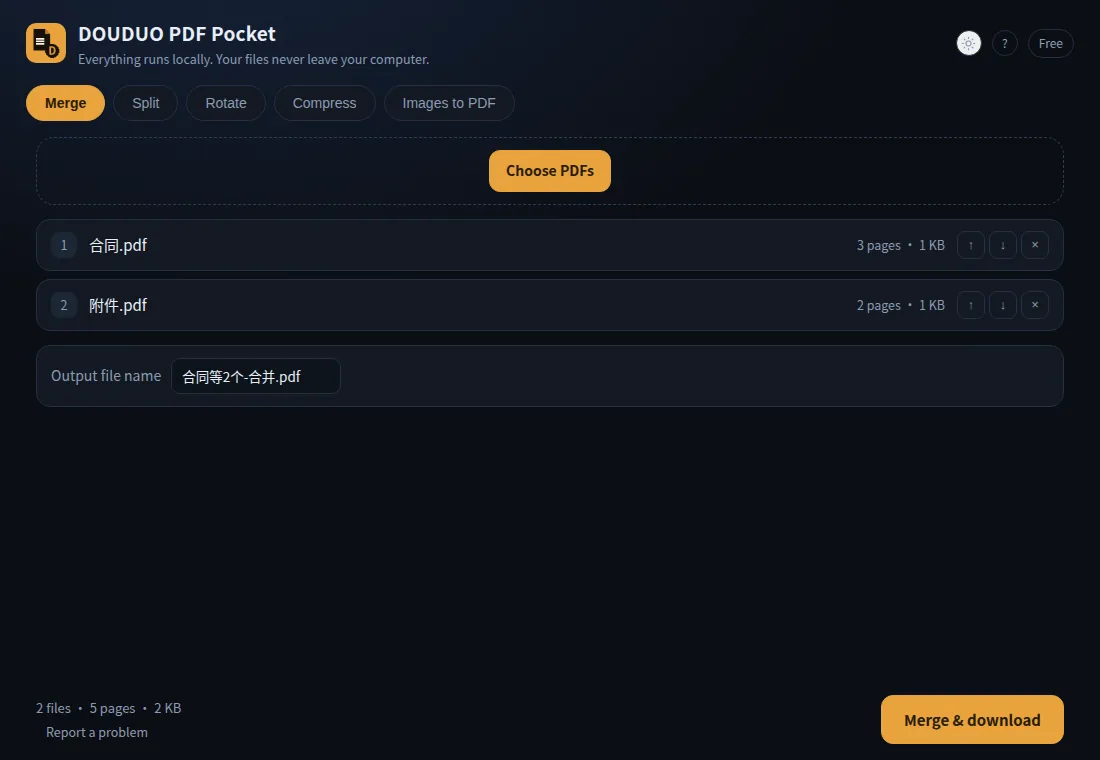
Merge, split, rotate and compress PDFs in your browser. Files never leave your computer — no upload, no account, no server.
Install (30 seconds)
- Store: search "DOUDUO PDF Pocket" in the Edge Add-ons store, click Install.
- Offline zip: extract
pdfpocket-1.1.8-local.zip→ openedge://extensions(orchrome://extensions) → turn on Developer mode → "Load unpacked" → pick the extracted folder.
Click the orange icon in the toolbar to open the workbench.
What you see while it works
A progress bar sits above the download button:
- merge counts files, rotate/compress count pages, images count images
- tasks shorter than 0.3 s don't show a bar (so it doesn't flash)
- when it finishes you get name + size + time, e.g.
Done: contract-merged.pdf (2 KB · 1.3s)
Output names follow your first file
| You picked | Result |
|---|---|
contract.pdf |
contract-merged.pdf |
contract.pdf + appendix.pdf |
contract+1-merged.pdf |
Split gives contract-1.pdf, contract-2.pdf… Type your own name once and it stays.
Features
1. Merge
Drag several PDFs → "Merge & download". Order = list order; use ↑↓ to reorder. The merged file keeps every page and its text layer.
2. Split
Split every N pages, or extract specific pages (1-3,5). Free exports only the first part; Pro exports all parts in one go.
Why aren't the parts smaller? Two cases:
| Source | Result |
|---|---|
| Scanned PDF (one image per page) | each part ≈ 1/N — e.g. 1.86 MB → 4 × ~470 KB |
| Text PDF | each part close to the original — e.g. 283 KB → 4 × ~249 KB |
A text PDF shares one font set across all pages, so every part must carry the fonts it uses; that's not duplicate packing. The app tells you when this happens.
3. Rotate
90° / 180° / 270°, whole document or selected pages. Rotation is metadata — text stays selectable, file size barely changes.
4. Compress
Re-encodes embedded images (three levels: light / normal / strong). Text and vectors stay crisp. A 300dpi scanned book page typically shrinks 30–60 %; a text-only PDF barely changes.
5. Images to PDF
JPG/PNG → one A4 page per image, scaled to fit, 24 pt margin. Free: 5 images; Pro: unlimited.
6. Invoice sheets (Pro)
Many single-page invoices/receipts → one A4 PDF, 2 per page, cut line in the middle, numbered automatically.
Print at 100 % / actual size — "fit to page" shifts the cut line.
7. Watermark (Pro)
Tick "Add watermark" on the merge tab, type text (CJK works), merge. Text is drawn 30° across the page at ~16 % opacity; size scales with the page.
It is a visible overlay, not encryption — it can be screenshotted or removed by a PDF editor.
Free vs Pro
| Free | Pro | |
|---|---|---|
| Files per run | 3 | unlimited |
| Pages per run | 50 | unlimited |
| Split | first part only | all parts |
| Images to PDF | 5 | unlimited |
| Watermark / invoice sheets | — | ✓ |
Pro is US$6 once, not a subscription.
Activate
Pro → paste your licence key → Activate. The key is verified locally (ECDSA); no network, no account. It is not tied to a machine — paste it again on a new computer.
Privacy
The extension requests a single permission: storage. It makes zero network requests; nothing is uploaded or collected. PDFs are processed in memory and disappear when you close the tab. Full policy: privacy.
Limits
- Encrypted / permission-protected PDFs must be re-saved first (open → Print → Save as PDF)
- No OCR: text inside scanned images is not searchable
- Compress only touches embedded images
- Tested on Chromium/Edge on Linux; Windows and macOS are expected to work but are not machine-verified by us yet
Feedback
Email zzhlmgj@163.com with the version (shown at the bottom of the "Report a problem" dialog) and, if possible, the PDF that failed. The extension never sends anything by itself.